Product announcement ·
Meet the new CONSAI Farmer Dashboard
Your farm. Your next step. The new CONSAI Farmer Workspace connects an illustrated farm and interactive 3D stations with practical workflows. Instead of starting with a wall of forms, farmers can explore a recognizable place and choose what to do next. Conventional navigation remains available alongside the visual experience.
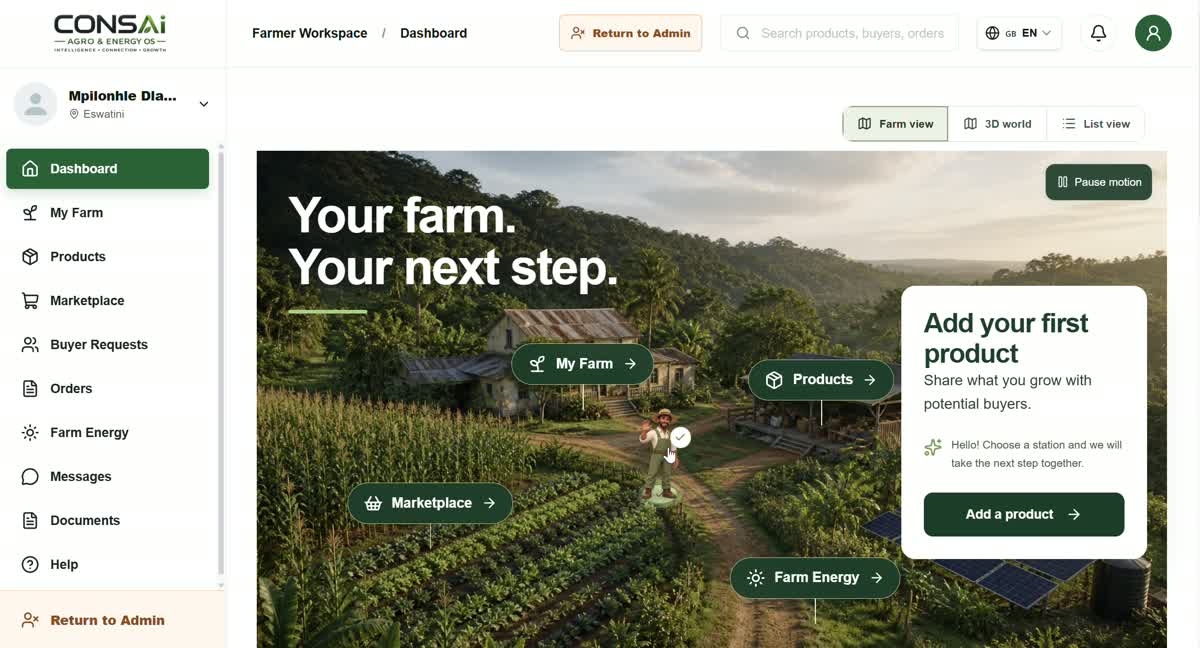
Recorded interface: English. These silent demonstrations include example entries; the explanations below describe each workflow.
Watch the walkthroughs
Your dashboard, a clearer starting point
Explore the farm scene, guided tour and milestones. My Farm, Products, Marketplace and Farm Energy lead to practical next steps. The illustrations help navigation; they are not a survey of your real farm.
My Farm: field records and mapping
Open field records, the field map and the field journal. The walkthrough shows boundary drawing and scouting-note preparation. Check the actual location and your information before saving a real record.
Products: from harvest to a clear offer
Use the packing station to prepare photos, product details, quantities and prices. Review the information and publication settings before publishing. The example quantities and prices in this recording are not verified stock or an offer.
Marketplace: understand the next trade step
Explore buyer requests, your offers, and orders and delivery. Compare requirements with your produce and clarify missing details. A listed request is not a confirmed purchase, and exploring a station does not accept an offer.
Farm Energy: describe the need first
Explore the solar station and a guided request for location, project needs, energy and costs. Irrigation, cold storage, batteries and diesel replacement require site-specific review. Example savings assumptions are not validated project results.
A geographic view of the wider network
The supplied world-map recording shows clustered geographic records. It is a recorded snapshot, not a live counter of active members, verified customers or Farmer Dashboard usage.
Your next step
Sign in to your own account and open the Farmer Workspace if it is available for your role. Start with a farm record or product, then review before saving or submitting. Strategic partners can share this article with farmers and cooperatives and support onboarding. Share the public link, never passwords or personal activation links.
Product listings do not guarantee sales. Energy requests do not guarantee funding or savings. Illustrations and 3D stations are navigation aids, not certifications or transaction confirmations.